|
How to Make a Payment
We have created this little guide to help
guide you through the payment process. If you need any support with payment feel
free to contact us. 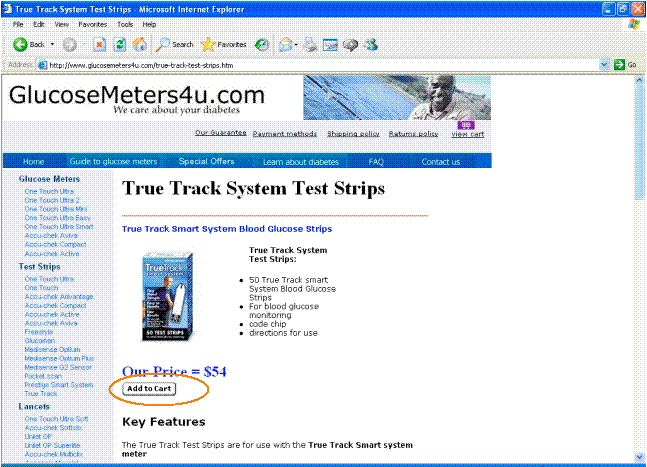
1) Select the product you would like to purchase and click
on the "Add to Cart" button underneath the product picture.
2)
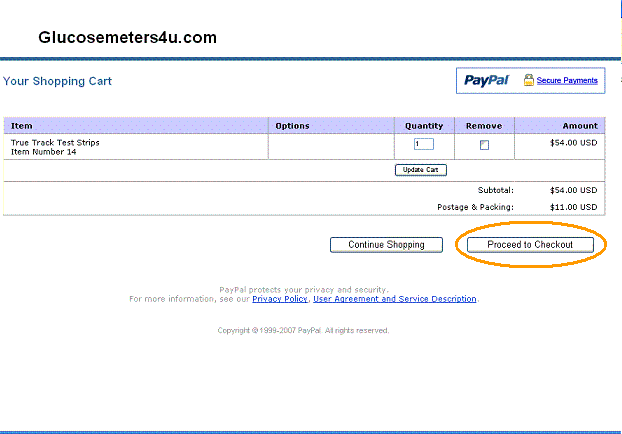
A new window will open showing you your shopping cart. If you wish to add more
items to your cart then click on the "Continue Shopping" button. If
you have the items you wish to purchase in your cart and wish to make payment
then click on the "Proceed to Checkout".
If
you are having any problems accessing your shopping cart it may be due to your
computer or virus protection software. Make sure you have switched off any settings
which may prevent a new window from opening such as ad pop up blocking etc. 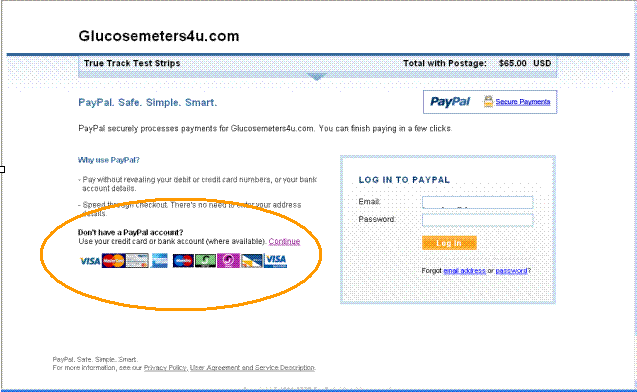
3)
If you would like to make payment by credit card then click on "Continue"
in the "Don't have a PayPal account" section, highlighted above. Some
of our customers often assume that they need to have a PayPal account to make
payment. This is not the case. We accept payment by Visa, Mastercard and
American Express and you do not need to have a Paypal account nor do you need
to sign up to PayPal to make a payment. 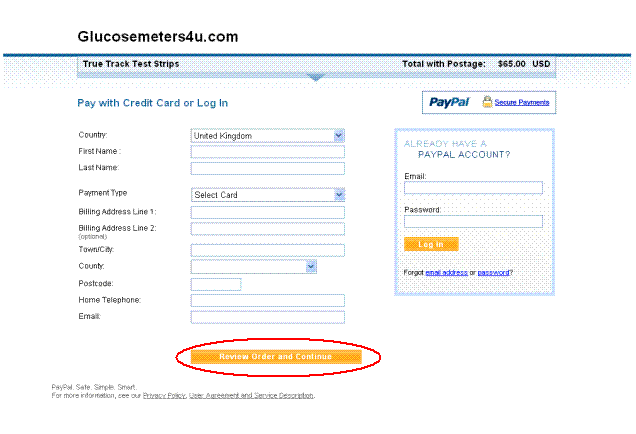
4)
Enter your details and Credit Card details in the relevant sections and press
the "Review Order and Continue". And that's it. It couldn't be easier.
After Payment you will be directed to our Completed Transaction page.
Paypal uses Secure Sockets Layer (SSL) technology to make sure your payment is
transmitted securely and confidentially.
If
you have any problems in making payment contact us and let us help you. You can
email us via our feedback form or email address by clicking on the Contact
us link. |